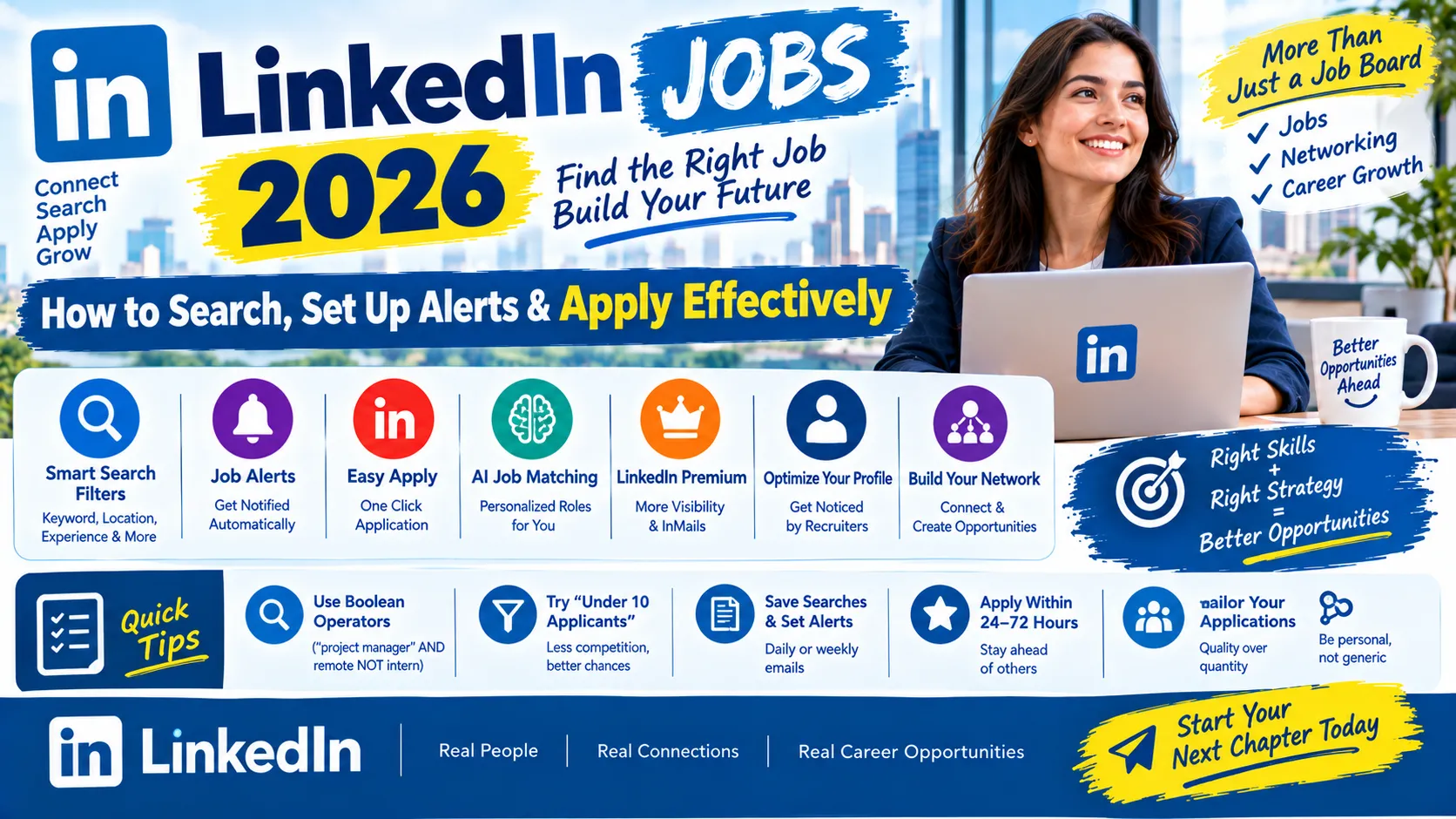

LinkedIn Jobs is one of the world’s largest job search platforms, combining a searchable jobs board with your professional network and public profile — meaning your search results and your visibility to recruiters are connected in a way most other job boards don’t offer. This matters because searching LinkedIn well is a genuinely different skill from searching it casually: precise filters, Boolean search operators, and a properly optimized profile can be the difference between finding relevant roles quickly and endlessly scrolling generic results.
Quick Facts
| Detail | Information |
|---|---|
| What it is | A professional networking platform with an integrated job search and application feature |
| Where to access Jobs | Click the Jobs tab in the top navigation, or go directly to linkedin.com/jobs |
| Key search tools | Keyword/title search, location filter, Boolean operators (AND, OR, NOT, quotes, parentheses), “Under 10 applicants” filter, salary range filter, experience level, employment type |
| Easy Apply | LinkedIn’s one-click application feature using your existing profile — fast, but less personalized than a tailored application |
| Job alerts | Set up via “Create alert” on a saved search; choose email and/or push notifications, daily or weekly frequency |
| AI job matching (2026 feature) | LinkedIn can surface roles matching your profile automatically, based on your Skills section and “Open to Work” status, even without an active search |
| Premium Career subscription | Reportedly around $30/month, offering potential visibility boosts in recruiter searches and a limited number of InMails — cost and specific benefits should be confirmed directly on LinkedIn, as this figure comes from third-party reporting |
| Recommended approach (per multiple career-advice sources) | Quality over volume — 5–15 well-targeted applications are commonly recommended over 100+ generic Easy Applies |
Important: LinkedIn’s own algorithm, filters, and Premium features can change over time — always check the platform directly for the current, exact functionality, since some specifics in third-party guides may lag behind LinkedIn’s actual interface.
How to Search Jobs Effectively
- Go to the Jobs tab (or linkedin.com/jobs) and enter a job title or keyword in the search bar, plus a location (or leave location blank for remote/global results).
- Apply filters to narrow results — commonly available options include employment type (full-time, contract, part-time), experience level, salary range, and the number of applicants so far.
- Use the “Under 10 applicants” filter if you want to prioritize less-competitive listings — this is a commonly recommended tactic across multiple career-advice sources for improving your odds relative to highly competitive postings.
- Use Boolean search operators to sharpen your queries:
- Quotes for exact phrases:
"project manager" AND/ORto combine terms:marketing AND remoteNOTto exclude terms:java NOT javascript- Parentheses to group terms:
(data analyst OR "business intelligence") AND SQL
- Quotes for exact phrases:
- Save searches you like, and turn on alerts so new matching roles come to you automatically rather than requiring repeated manual searching.
Setting Up Job Alerts
- Run a search using your target title, keywords, and location.
- Click “Create alert” (commonly found at the bottom of the search results page).
- Choose to receive alerts via email, push notification, or both.
- Set the frequency — typically daily or weekly.
- Set up multiple alerts (a commonly suggested range is 3–5) covering different target roles or title variations (e.g., “Backend Engineer,” “Software Engineer – Backend,” “API Developer”) to widen your net without needing to manually re-search each variation.
- Prune alerts that stop returning good matches every few weeks — a stale alert just adds noise and inbox clutter.
Easy Apply vs. Applying on the Company’s Own Site
- Easy Apply submits your existing LinkedIn profile directly to the employer with one click. It’s fast, but impersonal, and is commonly recommended for roles you’re moderately interested in, or for casting a wide net (testing many applications at once).
- Applying directly on the company’s own website with a tailored resume and cover letter is commonly recommended for roles you’re genuinely targeting, since some employers reportedly prefer or prioritize direct-site applications over Easy Apply submissions.
- Neither approach is universally better — the practical advice across multiple sources is to use Easy Apply for speed on secondary options, while still tailoring your profile and headline so it supports even a one-click application.
Optimizing Your Profile for Recruiter Visibility
Since recruiters can search LinkedIn’s database directly (not just review applications you submit), your profile itself functions as a discoverability tool:
- Write a specific, not “clever,” headline — for example, “Product Manager | SaaS | Growth and Experimentation” rather than a vague tagline
- Complete your About/Summary section with your skills and quantifiable achievements
- Keep your Skills section current — this reportedly feeds LinkedIn’s AI-powered job matching, surfacing relevant roles even without an active search
- Turn on “Open to Work” (the visible green profile-photo frame) if you want recruiters and LinkedIn’s matching system to know you’re actively searching
- Collect endorsements and recommendations where possible, since these add credibility to a recruiter’s first scan of your profile
- Make your profile easy to scan in under 30 seconds, since recruiters commonly search by keyword before ever seeing a full application
Networking as Part of Your Job Search
- Personalize connection requests with a specific reason for connecting, rather than sending generic blank requests
- Engage with your network’s posts and content — visibility in others’ feeds can lead to being noticed for opportunities before they’re even posted
- Reach out with informed curiosity, not a blunt ask — a message like “I’m exploring [role type] and would value your perspective on [specific question]” is commonly recommended over “Are you hiring? I need a job.”
- Follow companies you’re interested in (via their Company Page) to stay updated on new postings and company news
A Realistic Weekly Routine
Multiple career-advice sources converge on a similar practical rhythm:
- Review new roles matching your saved searches/alerts daily or a few times per week.
- Apply promptly to genuinely well-matched roles — several sources suggest applying within 24–72 hours of a posting improves your relative visibility, though the exact percentage improvement cited varies between sources and should be treated as directional, not a guaranteed outcome.
- Follow up on submitted applications within a reasonable window (commonly suggested as 24 hours) to stay visible.
- Treat LinkedIn as one channel among several in your job search — commonly suggested as roughly 30–40% of your overall search effort — rather than your only source of opportunities.
Common Mistakes to Avoid
- Using Easy Apply on hundreds of jobs indiscriminately — quality, targeted applications are consistently recommended over high-volume, generic ones.
- Neglecting your profile while actively job searching — recruiters frequently search by keyword and review profiles directly, so a weak profile undercuts even a strong application.
- Sending generic, transactional connection requests — personalized outreach with a specific reason performs better than a blunt ask for help.
- Letting stale job alerts pile up — prune alerts that no longer surface good matches to keep your search focused.
- Treating LinkedIn as your only job search channel — it’s a strong discovery and visibility tool, but should be combined with other job boards and direct company applications.
- Trusting every statistic in a career-advice blog as LinkedIn’s official data — many specific percentages circulating online come from third-party vendor reports, not LinkedIn itself, and can vary between sources.
FAQs
1. Is Easy Apply better than applying on a company’s own website? Neither is universally better — Easy Apply is faster and better suited to secondary/moderate-interest roles or casting a wide net, while a tailored application on the company’s own site is generally recommended for roles you’re most genuinely targeting.

2. How do I set up job alerts on LinkedIn? Run a search with your target keywords and location, click “Create alert,” choose email and/or push notifications, and set the frequency to daily or weekly.
3. What are Boolean search operators, and how do I use them on LinkedIn? They’re search techniques to sharpen your results — quotes for exact phrases, AND/OR to combine terms, NOT to exclude terms, and parentheses to group terms together.
4. Does applying quickly after a job is posted actually improve my chances? Several sources suggest applying within 24–72 hours improves visibility, though exact percentage figures cited (e.g., “40% higher interview chance”) come from third-party reports and vary between sources — treat these as directional guidance, not guaranteed outcomes.
5. Is LinkedIn Premium worth it for job searching? It reportedly offers visibility boosts and a limited number of InMails, at a cost of roughly $30/month per third-party reporting — whether it’s worth it depends on your field’s competitiveness and how heavily you rely on LinkedIn specifically; confirm current pricing and features directly on LinkedIn.
6. How many jobs should I apply to on LinkedIn? Multiple sources recommend prioritizing quality over volume — a commonly cited range is 5–15 well-targeted applications rather than 100+ generic Easy Applies.
7. What does the “Under 10 applicants” filter do? It narrows results to postings with less competition so far, which several guides recommend as a tactic for improving your relative odds.
8. How does LinkedIn’s AI job matching work? It’s reported to surface roles matching your profile automatically — even without an active search — based on signals like your Skills section and “Open to Work” status.

9. Should I only use LinkedIn for my job search? No — most career-advice sources recommend treating LinkedIn as one channel (commonly suggested as roughly 30–40% of your overall effort) alongside other job boards and direct company applications.
10. What should my LinkedIn headline say? A specific headline naming your role type and key skills (e.g., “Product Manager | SaaS | Growth and Experimentation”) is commonly recommended over a vague or overly clever tagline.

11. How do I make my profile more visible to recruiters? Keep your headline, About section, and Skills section current and specific, turn on “Open to Work” if searching, and collect endorsements/recommendations where possible.
12. Is it better to send a lot of connection requests to find a job? Quality over quantity applies here too — personalized requests with a clear, specific reason for connecting are commonly recommended over generic, high-volume outreach.
Final Words
LinkedIn Jobs works best when treated as a search system rather than a scrolling feed: precise filters and Boolean search, saved alerts, a genuinely optimized profile, and selective use of Easy Apply combine to surface better-matched roles with less wasted effort. Since some of the specific performance statistics circulating in career-advice content come from third-party reports rather than LinkedIn itself, treat them as general guidance rather than guaranteed outcomes — and remember that LinkedIn works best as one part of a broader job search, not the only one.

Iqra Rasheed
 Verified Author
is a Jobs & Career Content Specialist at freejobspk.com, providing clear and source-based information about government jobs, recruitment updates, eligibility, deadlines, and application procedures in Pakistan.